
The question sounds simple. But ask it in a meeting room with ten people working in a medium-sized organization and you'll get ten different answers. Someone mentions the systems they use daily. Someone else mentions the ones that IT runs. No one has the whole picture. It's not a communication problem. It's a mapping problem.
Why no one has the whole picture
IT systems are added over the years, often without a central registry. A department acquires a tool. An integration is built against an external system. A cloud service is activated for a project and stays there. Every decision was made for a reason, but none held the whole together.
The result is an IT environment that is difficult to monitor. Not because the systems are secret, but because they have never been documented comprehensively.
This creates practical problems. When a system is to be decommissioned, no one knows which other systems depend on it. When a new employee is to be onboarded, it is unclear which permissions are required for what. When an audit asks about your information security, no one can show a complete picture of what you have and how it is connected.
What system mapping actually means
System mapping is not a project. It is a register and a process to keep it alive.
Each IT system in the organization is documented as an object with a number of basic attributes: what the system is used for, who is the system owner from a business perspective, who manages it technically, which users or groups use it, and what dependencies there are on other systems.
The classification of the system can be linked to your information classification: does the system handle confidential information? Personal data? What accessibility does the business require?
All of this is information that already exists in the organization fragmented, scattered in emails, documents, and individual people's memories. The system mapping collects it.
Relationship models – see the whole picture right away
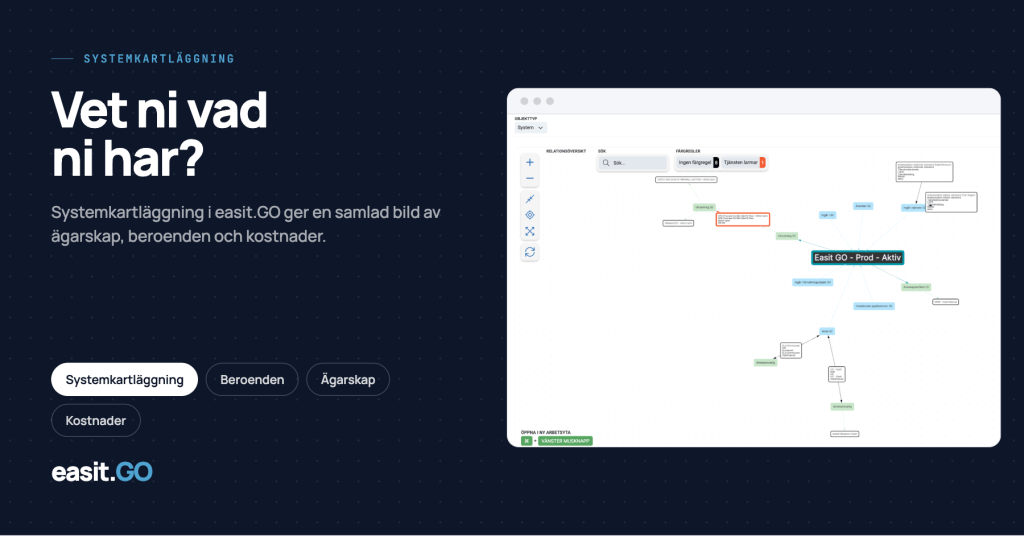
What makes system mapping in Easit GO different from a list in a spreadsheet are the relationship models.
Instead of describing dependencies in text, they are visualized. System A is dependent on system B. System B integrates with systems C and D. System D handles personal data and is linked to your treatment record.
This picture is updated continuously as you work in the system. It reflects reality, not what it looked like when the survey was done three years ago.
This provides direct practical value. When you plan a change in a system, you immediately see which other systems and processes may be affected. When a system is to be decommissioned, the dependencies are clear. When an incident occurs, you can quickly identify what is connected to the affected system.
The connection to management, permissions and security
The system mapping is the foundation on which everything else is built.
Management plans require you to know what systems you have and who owns them. Without a complete mapping, the foundation is missing.
Permission management requires you to know which systems handle sensitive information and which roles need access. Mapping provides that context.
Information security requires that you can show which systems handle personal data, how they are connected, and who is responsible. Without mapping, you cannot answer those questions.
The three processes are not independent. They are interconnected, and system mapping is the foundation on which they rest. We have written about management plans and about authorization management in recent weeks. System mapping is the step before that. You need to know what you have before you can manage and protect it.
Frequently asked questions
What is system mapping?
A comprehensive documentation of the organization's IT systems: purpose, owners, dependencies and connection to business processes. The basis for administration, authorization management and information security.
What is the difference from a management plan?
The system mapping is the inventory – a picture of what you have and how it is connected. The management plan goes deeper into each individual system and describes how it is managed. The mapping is the foundation; the management plan is the next step.
Can you do system mapping in Easit GO?
Yes. System objects with owners, classification, dependencies and history – visualized with relational models and kept alive continuously. Configured by your designer, without code.
You don't need to know everything about every system. But you do need to know what systems you have, who owns them, and how they are connected. That's the foundation.
Want to see what system mapping can look like in Easit GO? Book a demo
Read also

Henrik Traveler
Commercial Product Manager
henrik.resare@easit.com
+46 70 249 36 06